📌 PC Bottleneck Calculator & Bottleneck Checker Key Takeaways
A bottleneck is when one part of your PC can't keep up with another. Usually it's your CPU starving your GPU, or a GPU that's too weak to keep the CPU busy.
Enter your CPU, GPU, RAM, and resolution. You get a bottleneck percentage, which component is the problem, and what to do about it. No downloads, no account.
GPU maxed out, CPU relaxed? That's normal gaming. Your GPU is the right bottleneck. Don't stress it unless your frame rates are actually bad.
CPU pegged at 99% while your GPU sits below 70%? That's the mismatch you want to fix. Before spending money, try bumping your resolution to 1440p or 4K — it moves more work to the GPU for free.
Rough thresholds: under 15% is balanced, 15–25% you'll probably not notice, 25–40% is worth investigating, above 40% something is genuinely mismatched.
Calculators estimate. For real answers, run MSI Afterburner while you're actually playing and watch the live usage numbers.
What Is a PC Bottleneck? (The 30-Second Explanation)
A PC bottleneck occurs when one hardware component — most often the CPU or GPU — operates at or near 100% capacity while another component sits underutilized, limiting the overall system's performance output.
The practical result: frame drops, stuttering, and inconsistent FPS even when your hardware looks powerful on paper. A $500 GPU paired with a five-year-old processor will never perform close to its rated capability because the processor cannot supply work fast enough to keep the GPU busy.
The term comes from the physics of fluid flow — the narrowest point of a bottle limits how fast liquid can pass through, regardless of how wide the rest of the bottle is. In a PC, the slowest component sets the ceiling for everything else.
Key Fact
According to hardware analysis data from UserBenchmark and PassMark, CPU-GPU mismatches account for the majority of reported "bad performance despite good hardware" cases among PC gamers. Getting the right CPU-GPU combination is as important as the quality of individual components.
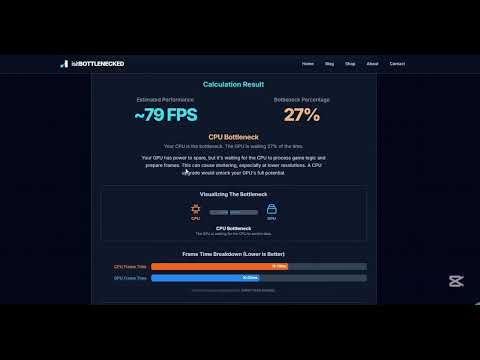
How to Use the CPU GPU Bottleneck Calculator
Three steps. Under 60 seconds. No technical knowledge required.
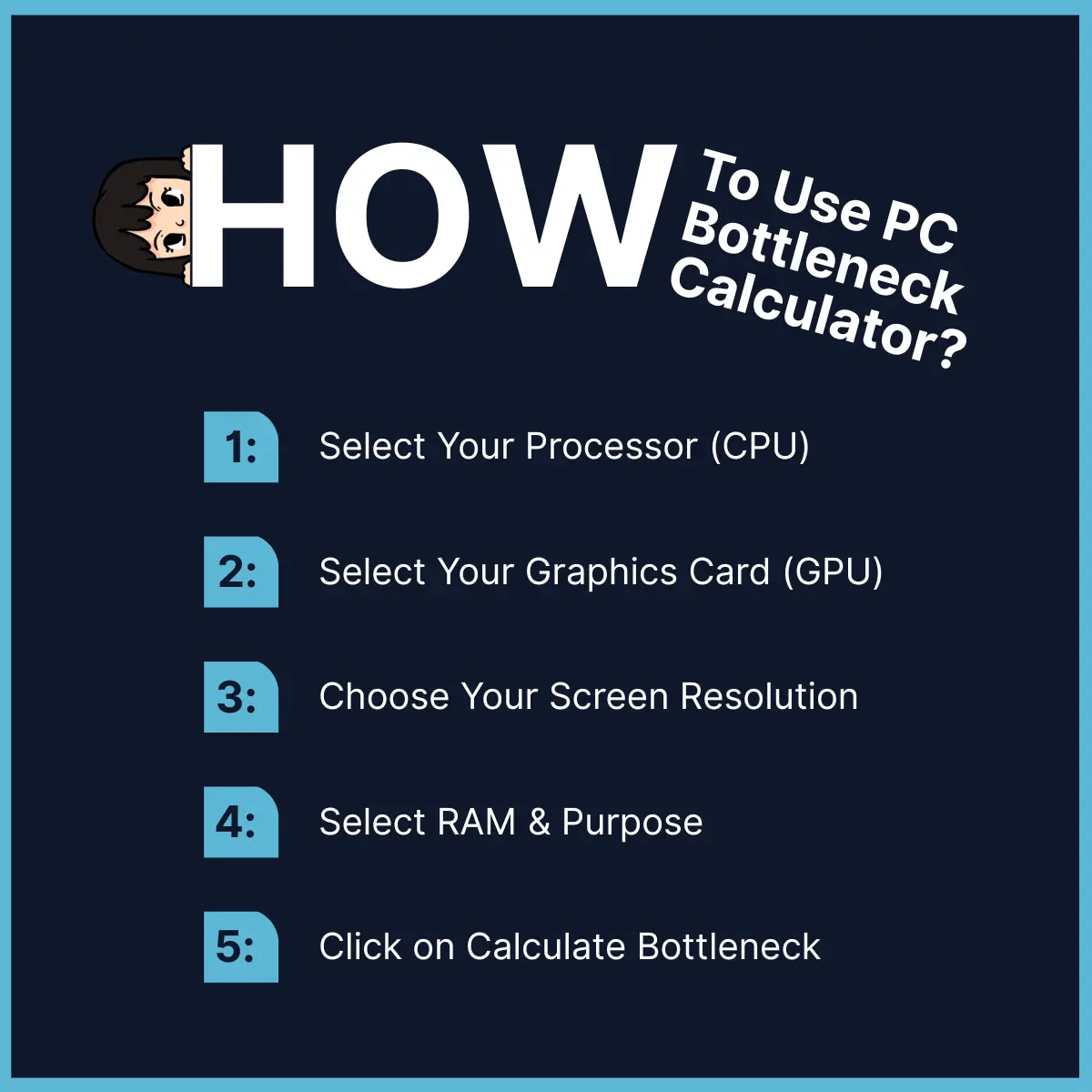
- Select your CPU — Enter your processor model (Intel Core i5/i7/i9, AMD Ryzen 5/7/9, or any current-generation chip).
- Select your GPU — Enter your graphics card model (NVIDIA RTX or GTX, AMD Radeon RX, Intel Arc, or any card currently in your system).
- Set your configuration — Choose your RAM amount, target resolution (1080p / 1440p / 4K), and primary use case (gaming, video editing, streaming, or general use).
Hit Calculate. The bottleneck calculator cross-references your specs against a database of real-world benchmark data from PassMark, UserBenchmark, and 3DMark, then returns:
- A bottleneck percentage (how mismatched your components are)
- A CPU-bound or GPU-bound verdict (which component is the limiting factor)
- A compatibility score for your specific CPU-GPU combination
- Specific upgrade recommendations ranked by cost-to-performance impact
Understanding Your Bottleneck Percentage
The bottleneck percentage this calculator produces tells you the degree of imbalance between your CPU and GPU. Here is what each range means in practice:
| Bottleneck % | Verdict | What It Means in Gaming |
|---|---|---|
| 0–10% | Perfectly balanced | No changes needed; hardware is well-matched |
| 11–20% | Minimal bottleneck | Barely noticeable; acceptable for most gamers |
| 21–39% | Moderate bottleneck | Measurable performance left on the table |
| 40–59% | Significant bottleneck | One component is clearly dragging the system |
| 60–100% | Severe bottleneck | Immediate hardware upgrade needed |
Important
A bottleneck percentage is not a measure of how bad your PC is. It measures how well-matched your components are to each other. A 15% bottleneck on a mid-range system is far less consequential than a 15% bottleneck on a high-end build where every frame matters.
CPU Bottleneck vs. GPU Bottleneck: The Key Difference
Understanding which component is bottlenecking your system determines your next upgrade. These two scenarios have completely different causes and solutions.
What Is a CPU Bottleneck?
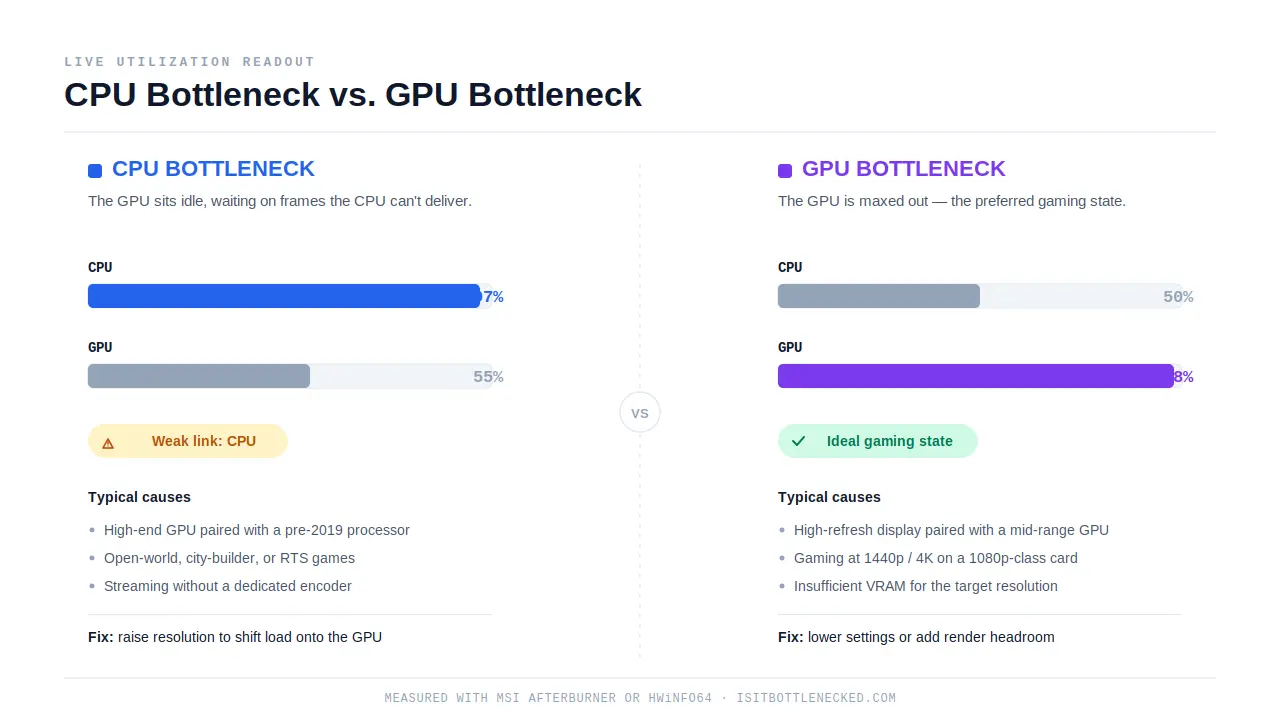
CPU bottleneck definition: A CPU bottleneck occurs when your processor cannot supply frames to your GPU fast enough, causing your GPU utilization to drop significantly below 100% even in demanding scenes. In live monitoring tools like MSI Afterburner or HWiNFO, a CPU bottleneck looks like this: CPU usage at 95–100%, GPU usage at 40–70%. The GPU is waiting for work that the CPU cannot deliver in time.
Common causes of CPU bottlenecks:
- Running a high-end GPU (RTX 4070 or above) with a processor released before 2019
- Playing CPU-heavy game genres: open-world RPGs, city builders, real-time strategy, and simulation games
- Streaming or recording while gaming without a dedicated encoder (NVIDIA NVENC or AMD VCE)
- Running multiple background applications that consume CPU threads
- Low-clock, high-core-count workstation CPUs paired with gaming-oriented GPUs
CPU bottleneck fix: The resolution increases load on the GPU and reduces load on the CPU. Raising from 1080p to 1440p or 4K is often the fastest way to reduce a CPU bottleneck without spending money.
What Is a GPU Bottleneck?
GPU bottleneck definition: A GPU bottleneck occurs when your graphics card cannot render frames quickly enough to match what your CPU and display are requesting, causing GPU utilization to peg at 99–100% while CPU usage stays well below its limit. In monitoring tools, a GPU bottleneck shows CPU usage at 40–60% and GPU usage at 95–100%. This is the preferred gaming state — your GPU is fully loaded, and your processor has headroom.
Common causes of GPU bottlenecks:
- Running a high-refresh-rate display (144Hz, 240Hz) with an older or mid-range GPU
- Gaming at 1440p or 4K with a GPU designed for 1080p
- Maxing out graphical settings (ray tracing, ultra textures, high MSAA) beyond the card's capability
- Insufficient VRAM for the resolution and texture quality being used (below 8GB at 1440p in 2026)
GPU bottleneck fix: Reduce resolution scale, lower texture quality or ray tracing settings, or upgrade to a GPU with more VRAM and higher render throughput for your target resolution.
How to Check if Your PC Is Bottlenecked Right Now
The bottleneck calculator above gives you an estimate based on benchmark databases. For a live, real-time bottleneck test during actual gameplay, follow these steps:
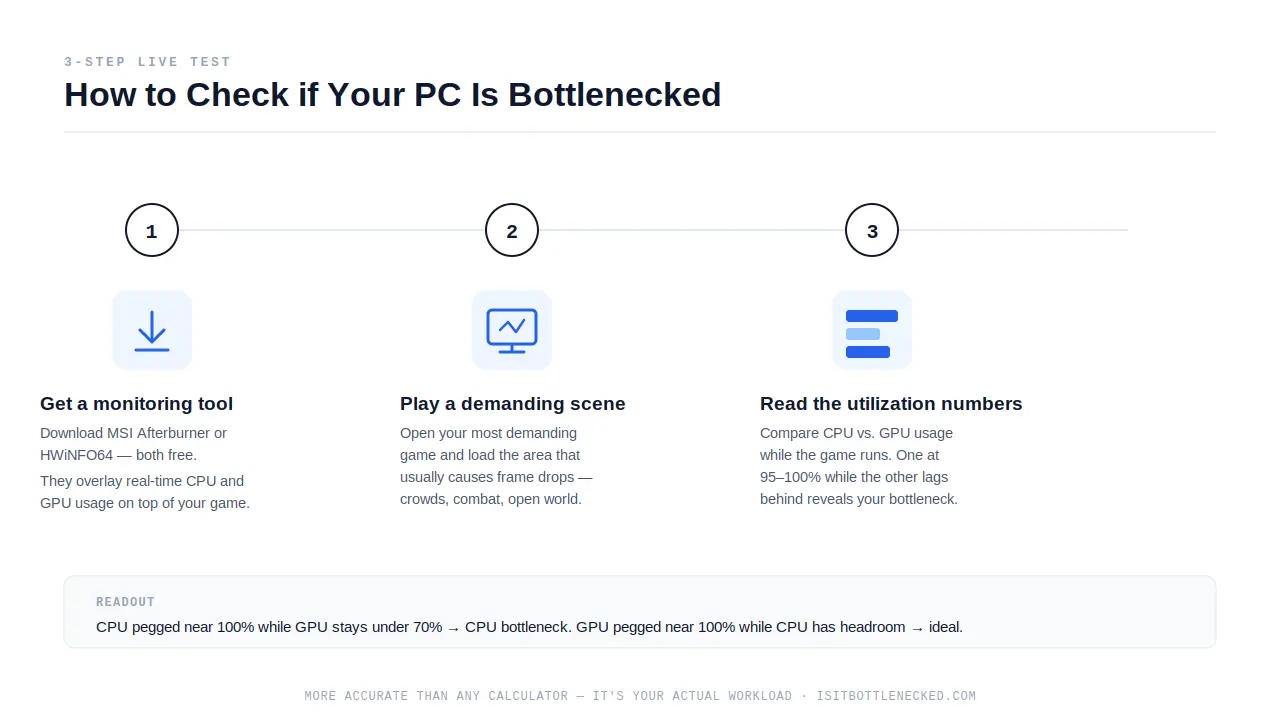
- Step 1: Download MSI Afterburner (free) or HWiNFO64 (free). Both tools show real-time CPU and GPU utilization overlaid on your game.
- Step 2: Open your most demanding game and play a scene that typically causes performance drops.
- Step 3: Read your utilization numbers while the game runs.
Quick Live Check: Read Your Utilization Numbers
| CPU Usage | GPU Usage | Diagnosis |
|---|---|---|
| Below 50% | Below 50% | Frame limiter, V-Sync, or engine bottleneck active |
| Below 50% | 95–100% | ✓ GPU bottleneck — ideal gaming state |
| 95–100% | 95–100% | Balanced system at hardware limit |
| 95–100% | Below 70% | ⚠ CPU bottleneck — processor is the weak link |
| 95–100% | High but not maxed | ⚠ CPU bottleneck approaching — upgrade CPU next |
This live bottleneck test is more accurate than any calculator because it reflects your actual workload, drivers, background processes, and thermal conditions.
The Full PC Bottleneck Check: CPU, GPU, RAM, and Storage
Most bottleneck tools only analyze CPU versus GPU. This calculator includes RAM and storage in its compatibility assessment because both cause real performance problems that a CPU-GPU check alone cannot detect.
RAM Bottlenecks
A RAM bottleneck occurs when your system runs out of physical memory, forcing it to use slower virtual memory (page file) on your drive, causing sudden and severe performance drops.
In 2026, 8GB of RAM is insufficient for modern AAA gaming. Games like Call of Duty: Warzone, Hogwarts Legacy, and Cyberpunk 2077 at high settings regularly use 12–16GB. When RAM runs out, frame rates can drop by 30–50% regardless of how capable your CPU and GPU are.
Additional RAM considerations that affect gaming performance:
- Dual-channel configuration over single-channel provides 10–30% memory bandwidth improvement in AMD Ryzen systems specifically
- XMP/DOCP profiles should be enabled in BIOS to run RAM at rated speed rather than the default 2133 MHz JEDEC standard
- DDR5 vs DDR4: DDR5 at equivalent speeds provides 10–15% bandwidth improvement on compatible platforms (Intel 12th gen and later, AMD AM5)
| Configuration | Gaming Impact | Recommended For |
|---|---|---|
| 8GB DDR4 | Insufficient in 2026 | Light browsing only |
| 16GB DDR4 dual-channel + XMP | Minimum viable for gaming | 1080p / 1440p gaming |
| 32GB DDR5 dual-channel | No memory bottleneck | Gaming + streaming / creation |
Minimum RAM for gaming in 2026: 16GB DDR4 dual-channel. Recommended: 32GB for simultaneous streaming or content creation.
Storage Bottlenecks
A storage bottleneck occurs when your drive cannot load game assets fast enough, causing texture pop-in, long load screens, and stuttering during open-world exploration.
An NVMe SSD (PCIe Gen 4 M.2) completes game asset loads that would take a hard disk drive (HDD) 30–60 seconds in under 3 seconds. In open-world games that stream environments in real time — like Microsoft Flight Simulator or Grand Theft Auto V — a slow HDD causes visible stuttering that no GPU upgrade can fix.
Storage upgrade priority for gaming in 2026: NVMe SSD (Gen 3 minimum, Gen 4 preferred) for your operating system and primary game library. HDDs are acceptable only for cold storage of infrequently played titles.
Why This Bottleneck Calculator Gives More Accurate Results
Most bottleneck calculators on the web compare CPU and GPU benchmark scores and output a single percentage. That approach ignores three factors that significantly affect real-world gaming performance: your target resolution, your RAM configuration, and your workload type.
This calculator weights all four variables:
- CPU performance score (core count, clock speed, architecture generation, cache)
- GPU performance score (shader count, VRAM, memory bandwidth, architecture tier)
- Target resolution (1080p is CPU-limited; 4K is GPU-limited — the same CPU-GPU pair can show a 30% swing in bottleneck percentage between resolutions)
- Workload type (competitive FPS titles are extremely CPU-sensitive; 4K open-world games are almost entirely GPU-bound; streaming adds CPU encoder load on top of game load)
What this calculator does not replace: live monitoring with MSI Afterburner or HWiNFO during actual gameplay. Real-world factors including thermal throttling, driver quality, background process load, and game engine optimization cannot be captured by any benchmark-based calculator. Use the tool to guide your upgrade decision; use live monitoring to confirm it.
Is My PC Bottlenecked? 5 Signs to Look For
Not everyone wants to run monitoring software. Here are five symptoms that indicate a bottleneck without any tools:
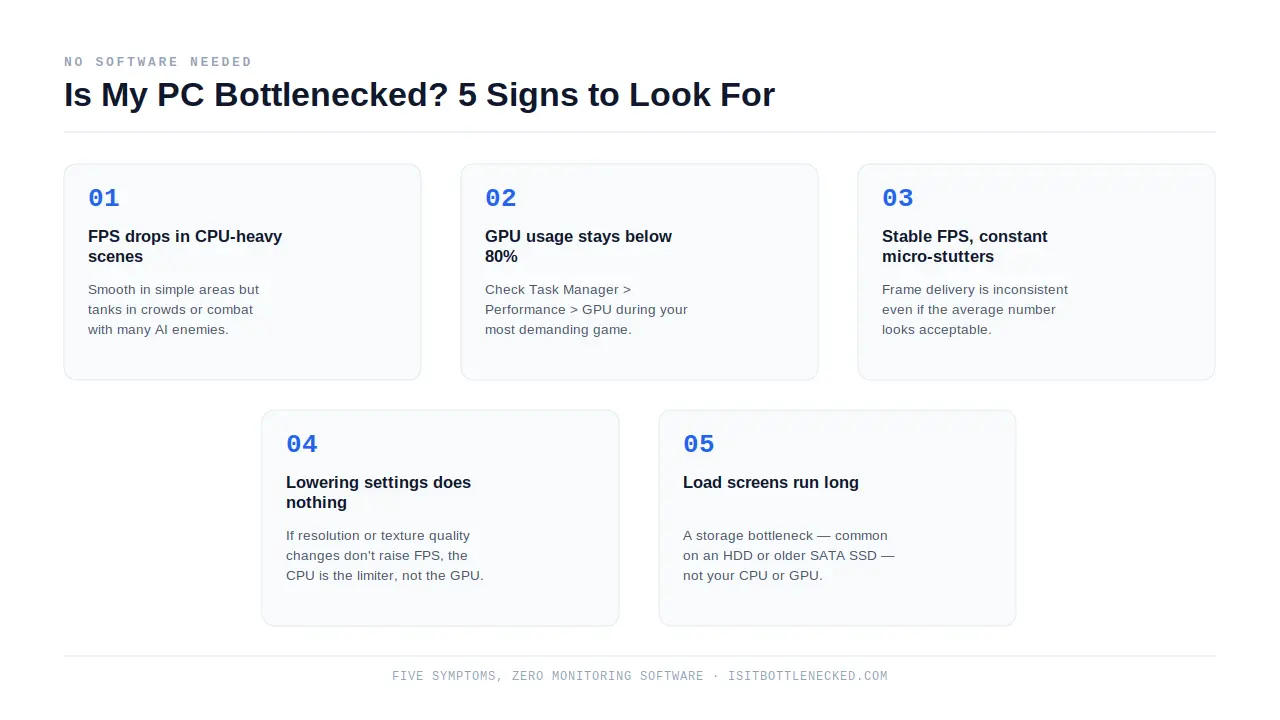
- 1
FPS drops specifically in CPU-heavy scenes
Performance is fine in simple areas but tanks in cities, crowds, or combat with many AI enemies — while performance is smooth in simpler environments. Classic CPU bottleneck pattern.
- 2
GPU usage below 80% in your most demanding game
Check Task Manager > Performance > GPU. If your graphics card rarely crosses 80% during gameplay and performance still feels poor, your CPU is not keeping the GPU busy.
- 3
Stable FPS but constant micro-stutters
Often caused by a CPU bottleneck where frame delivery is inconsistent even if the average frame rate looks acceptable. The FPS counter says 90 but the game feels jerky.
- 4
Performance does not improve when you lower graphical settings
If reducing resolution or texture quality does not increase FPS, your CPU is the limiter, not your GPU. GPU settings only help GPU-bound scenarios.
- 5
Load screens are significantly longer than others report
Storage bottleneck — especially if you are on an HDD or an older SATA SSD. If other players on the same game load in significantly faster than you, and your CPU and GPU seem fine, your drive is the culprit.
How to Fix a CPU GPU Bottleneck
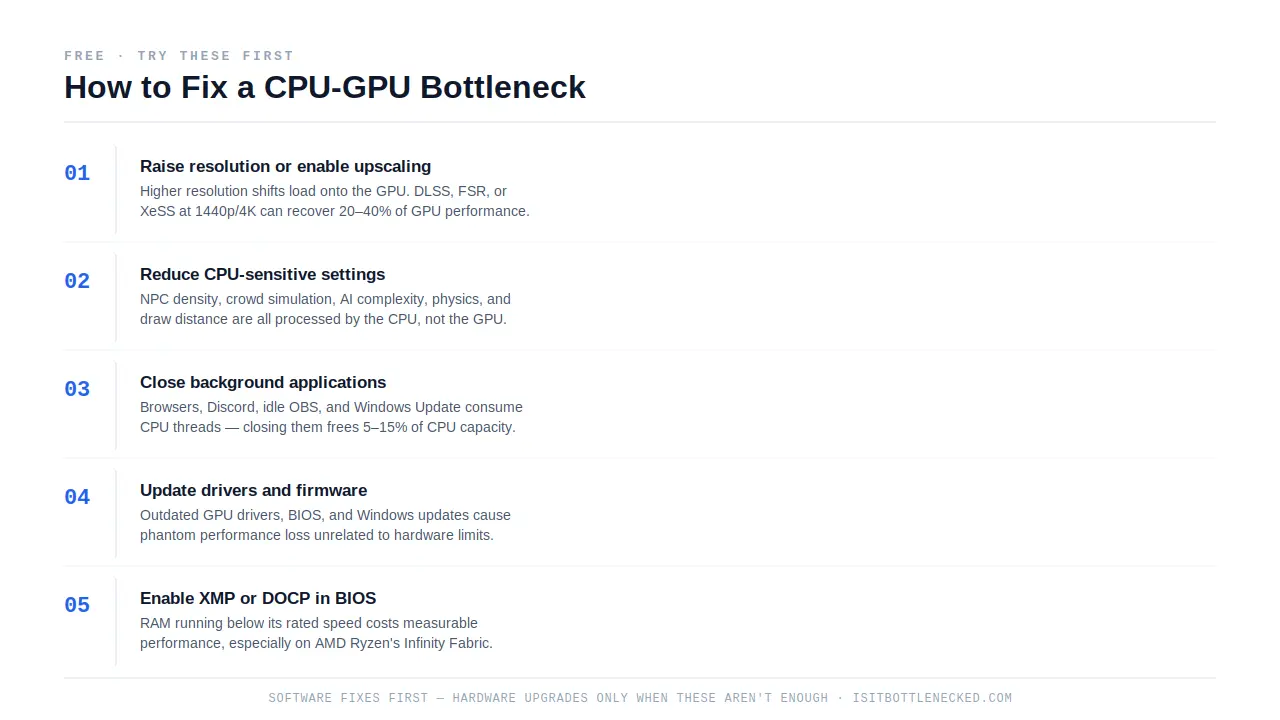
Software Fixes (Free, Try These First)
- 1
Raise your resolution or enable upscaling.
Higher resolution shifts processing load to the GPU, reducing the relative burden on the CPU. Enabling NVIDIA DLSS, AMD FSR, or Intel XeSS at 1440p or 4K can recover 20–40% of GPU performance with minimal visible quality loss while simultaneously relieving CPU pressure.
- 2
Reduce CPU-sensitive settings.
The following settings are processed by the CPU, not the GPU: NPC density, crowd simulation, AI behavior complexity, physics quality, and draw distance. Reducing these settings in CPU-heavy games provides meaningful FPS gains in bottlenecked systems.
- 3
Close background applications.
Web browsers, Discord, OBS (when not actively streaming), and Windows Update consume CPU threads. Closing unnecessary background processes during gaming frees 5–15% of CPU capacity depending on your system.
- 4
Update drivers and firmware.
Outdated GPU drivers, BIOS versions, and Windows updates cause phantom performance losses unrelated to hardware limitations. Always update GPU drivers before concluding that hardware is the bottleneck.
- 5
Enable XMP or DOCP in BIOS.
Running RAM at below-rated speeds (common when XMP is disabled) causes a measurable performance penalty, particularly on AMD Ryzen systems where memory speed directly affects Infinity Fabric bandwidth. Enable XMP/DOCP in BIOS settings and run RAM at its rated frequency.
Hardware Fixes (When Software Is Not Enough)
Upgrade the bottlenecked component first. This sounds obvious, but many gamers upgrade the wrong part. Dropping an RTX 4090 into a CPU-bottlenecked system powered by a Core i5-8400 will yield almost no improvement in CPU-bound games. Use the calculator or live monitoring to confirm which component is the limiting factor before spending money.
CPU upgrade path: If you are CPU-bottlenecked and your motherboard supports a newer processor generation, a CPU upgrade is the most cost-effective fix. Check socket compatibility (AM5, LGA1700, LGA1851) before purchasing. If a CPU upgrade requires a new motherboard, compare the total cost against a full platform migration.
GPU upgrade path: If you are GPU-bottlenecked, prioritize cards with adequate VRAM for your target resolution: 8GB minimum for 1080p, 12GB minimum for 1440p, 16GB+ for 4K with maximum settings in 2026.
Overclocking: Safely overclocking your CPU or GPU can reduce a moderate bottleneck (below 25%) by 5–15%. Use MSI Afterburner for GPU overclocking and AMD Precision Boost Overdrive or Intel Performance Maximizer for CPU overclocking. Monitor temperatures and stop if sustained load temperatures exceed 85°C for CPUs or 83°C for GPUs.
Balanced PC Build Recommendations (Zero Bottleneck, 2026)
These three build configurations are matched specifically to eliminate CPU-GPU mismatches at each price tier.
| Tier | CPU | GPU | RAM | Target Resolution | Bottleneck % |
|---|---|---|---|---|---|
| Entry $500–$800 | Intel Core i5-12400F | RTX 4060 / RX 7600 | 16GB DDR4-3200 | 1080p, high settings | 3–7% |
| Mid $1,000–$1,500 | Intel Core i7-13700K or Ryzen 7 7700X | RTX 4070 Super | 32GB DDR5-5600 | 1440p, ultra settings | 4–9% |
| High-end $2,000–$3,000 | AMD Ryzen 7 7800X3D | RTX 4080 Super / RTX 5070 Ti | 32GB DDR5-6000 | 4K or 1440p 240Hz | 2–6% |
The Ryzen 7 7800X3D in the high-end tier is the highest-performing gaming CPU available as of 2026, specifically due to its 3D V-Cache architecture, which dramatically reduces CPU bottlenecks in cache-sensitive game engines.
Will It Bottleneck? Checking Compatibility Before You Buy
The most common reason people use a bottleneck calculator is to check whether a new component is compatible with their current system before purchasing. Here is how to use this tool for that purpose:
Checking a new GPU against your existing CPU
Enter your current CPU and the GPU you are considering buying. If the bottleneck percentage is above 25%, the GPU will be limited by your processor and the upgrade will underperform. Consider whether your CPU can also be upgraded within budget, or choose a GPU one tier lower that better matches your current processor.
Checking a new CPU against your existing GPU
Enter the new CPU you are considering and your current GPU. A CPU upgrade that produces less than 10% bottleneck improvement over your current processor may not be worth the cost unless your current CPU is causing other issues (stuttering, instability, or thermal throttling).
Checking a complete new build
Enter your intended CPU and GPU combination along with your target RAM and resolution. Any result above 15% for a new build warrants reconsidering the component pairing, since you have the opportunity to choose matched parts before purchasing.
Frequently Asked Questions About Bottleneck Testing
What is a bottleneck in a computer?
A bottleneck is when one hardware component — most commonly the CPU or GPU — reaches maximum capacity while another component sits partially idle, preventing the system from reaching its full potential performance. The slower or weaker component limits the output of every other part of the system.
Will it bottleneck my PC?
Whether a component will bottleneck your system depends on three things: how the new part's performance compares to your existing hardware, your target resolution, and the type of games or applications you run. Use the calculator above to enter your exact configuration for a specific bottleneck percentage and compatibility verdict.
Am I bottlenecked right now?
Open MSI Afterburner or HWiNFO while playing your most demanding game. If your CPU usage is consistently above 90% while GPU usage is below 70%, you have a CPU bottleneck. If your GPU is at 98–100% and your CPU is relaxed, that is the ideal GPU-bound gaming state, not a problem.
Is a 10% bottleneck bad?
A 10% bottleneck is not bad. It is considered a well-balanced system. Bottleneck percentages below 15% are normal and have negligible real-world impact. Only percentages above 25–30% produce consistently noticeable gaming performance limitations.
What is an acceptable bottleneck percentage?
0–15% is considered balanced and acceptable for all gaming scenarios. 15–25% is a minor imbalance with limited real-world impact. Above 25% indicates a meaningful mismatch worth addressing. Above 40% indicates a significant mismatch that will consistently limit gaming performance.
How accurate are bottleneck calculators?
Bottleneck calculators are directional estimates, not exact measurements. They compare component benchmark scores and theoretical performance ratios. Real-world accuracy depends on the game engine, driver version, thermal conditions, and background processes running during gameplay. A calculator result should be confirmed with live monitoring tools (MSI Afterburner, HWiNFO) during actual game sessions.
Can I have a CPU bottleneck and a GPU bottleneck at the same time?
No. By definition, only one component can be the primary limiting factor at a time. However, the bottleneck can shift between CPU and GPU depending on the scene — some game areas are heavily CPU-bound (large cities, indoor environments with many NPCs) while others are GPU-bound (outdoor environments, high draw-distance landscapes).
Does resolution affect bottleneck percentage?
Yes, significantly. Higher resolution shifts processing load from the CPU to the GPU. The same CPU-GPU pair that shows a 30% CPU bottleneck at 1080p may show only a 5% bottleneck at 4K. If you are CPU-bottlenecked at 1080p, playing at 1440p is often the fastest free solution.
What is the best free tool to check bottleneck?
The isitBOTTLENECKED calculator on this page provides a free, online bottleneck check with no downloads or registration required. For live in-game monitoring, MSI Afterburner (free) combined with RivaTuner Statistics Server (RTSS) provides real-time CPU and GPU utilization overlaid directly on your game.
How do I fix a CPU bottleneck without buying a new CPU?
Raise your gaming resolution to 1440p or 4K (shifts load to GPU), enable DLSS or FSR upscaling, reduce CPU-heavy in-game settings such as draw distance and NPC density, close background applications, update your BIOS, and enable XMP/DOCP for your RAM. If your CPU is severely bottlenecking a high-end GPU, hardware replacement will eventually be necessary.
Does RAM affect CPU bottleneck?
Yes. Slow or single-channel RAM can create a secondary CPU bottleneck, particularly on AMD Ryzen platforms where memory bandwidth directly feeds the processor's Infinity Fabric interconnect. Running 16GB of DDR4 in dual-channel at XMP speed (3200–3600 MHz) versus a single stick at 2133 MHz can improve CPU-bound game performance by 10–20%.
Should I upgrade CPU or GPU first?
Upgrade whichever component the bottleneck calculator identifies as the limiting factor. If you are CPU-bottlenecked, upgrading the GPU wastes money because the CPU will continue to limit performance. If you are GPU-bottlenecked, upgrading the CPU first provides almost no FPS improvement in most games.
Can a GPU bottleneck cause stuttering?
Yes. When a GPU cannot maintain a consistent frame rate at your display's refresh rate, the result is not just low average FPS but also frame time inconsistency — perceived as stuttering or micro-stutters even when the FPS counter looks reasonable. V-Sync and frame pacing technologies help smooth this, but the underlying GPU capability is the fix.
Is GPU bottleneck bad for gaming?
A GPU bottleneck — where the GPU is at 98–100% and the CPU has headroom — is actually the ideal gaming state. It means your CPU is not limiting your GPU. The only concern is whether your GPU has enough performance for your target FPS and resolution. If your GPU is maxed and you are satisfied with performance, it is working exactly as intended.
What causes a PC to bottleneck?
The most common causes of CPU-GPU bottlenecks are: pairing a high-performance GPU with an older-generation processor, gaming at lower resolutions where CPU demands are highest, running CPU-intensive game genres, streaming or recording without hardware encoder support, and running resource-heavy background applications during gameplay.
How do I do a bottleneck test?
To run a bottleneck test: (1) Use the calculator on this page for a quick estimate based on your component specifications. (2) For a real-time test, install MSI Afterburner and the RivaTuner Statistics Server, enable the on-screen display, and monitor CPU and GPU utilization during your most demanding game. Any component consistently above 90% while the other is below 70% is the bottleneck.